Note
Click here to download the full example code
Diagonal
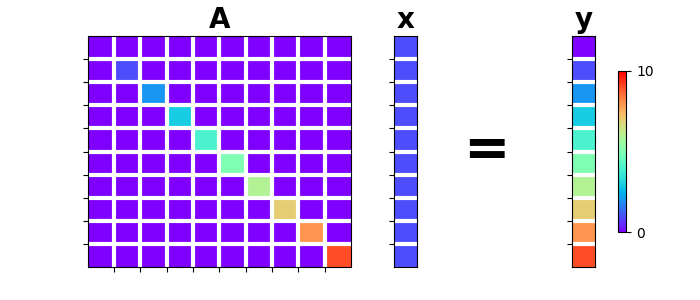
This example shows how to use the pylops_distributed.Diagonal
operator to perform Element-wise multiplication between the input
vector and a vector \(\mathbf{d}\).
In other words, the operator acts as a diagonal operator \(\mathbf{D}\) whose elements along the diagonal are the elements of the vector \(\mathbf{d}\).
import numpy as np
import matplotlib.pyplot as plt
import matplotlib.gridspec as pltgs
import dask.array as da

import pylops_distributed

plt.close('all')
Let’s define a diagonal operator \(\mathbf{d}\) with increasing numbers
from 0 to N and a unitary model \(\mathbf{x}\).
N = 10
d = da.arange(N, chunks=N//2)
x = da.ones(N, chunks=N//2)

Dop = pylops_distributed.Diagonal(d, compute=(True, True))

y = Dop * x
y1 = Dop.H * x

gs = pltgs.GridSpec(1, 6)
fig = plt.figure(figsize=(7, 3))
ax = plt.subplot(gs[0, 0:3])
im = ax.imshow(Dop.Op.matrix(), cmap='rainbow', vmin=0, vmax=N)
ax.set_title('A', size=20, fontweight='bold')
ax.set_xticks(np.arange(N-1)+0.5)
ax.set_yticks(np.arange(N-1)+0.5)
ax.grid(linewidth=3, color='white')
ax.xaxis.set_ticklabels([])
ax.yaxis.set_ticklabels([])
ax.axis('tight')
ax = plt.subplot(gs[0, 3])
ax.imshow(x[:, np.newaxis], cmap='rainbow', vmin=0, vmax=N)
ax.set_title('x', size=20, fontweight='bold')
ax.set_xticks([])
ax.set_yticks(np.arange(N-1)+0.5)
ax.grid(linewidth=3, color='white')
ax.xaxis.set_ticklabels([])
ax.yaxis.set_ticklabels([])
ax = plt.subplot(gs[0, 4])
ax.text(0.35, 0.5, '=', horizontalalignment='center',
        verticalalignment='center', size=40, fontweight='bold')
ax.axis('off')
ax = plt.subplot(gs[0, 5])
ax.imshow(y[:, np.newaxis], cmap='rainbow', vmin=0, vmax=N)
ax.set_title('y', size=20, fontweight='bold')
ax.set_xticks([])
ax.set_yticks(np.arange(N - 1) + 0.5)
ax.grid(linewidth=3, color='white')
ax.xaxis.set_ticklabels([])
ax.yaxis.set_ticklabels([])
fig.colorbar(im, ax=ax, ticks=[0, N], pad=0.3, shrink=0.7)
Out:
<matplotlib.colorbar.Colorbar object at 0x7f451ce26320>
Similarly we can consider the input model as composed of two or more dimensions. In this case the diagonal operator can be still applied to each element or broadcasted along a specific direction. Let’s start with the simplest case where each element is multipled by a different value
nx, ny = 6, 5
x = da.ones((nx, ny),  chunks=(nx//2, ny))
print('x =\n%s' % x)

d = da.arange(nx*ny, chunks=((ny*nx)//2)).reshape(nx, ny)
Dop = pylops_distributed.Diagonal(d, compute=(True, True))

y = Dop * x.flatten()
y1 = Dop.H * x.flatten()

print('y = D*x =\n%s' % y.reshape(nx, ny))
print('xadj = D\'*x =\n%s ' % y1.reshape(nx, ny))
Out:
x =
dask.array<ones, shape=(6, 5), dtype=float64, chunksize=(3, 5), chunktype=numpy.ndarray>
y = D*x =
[[ 0.  1.  2.  3.  4.]
 [ 5.  6.  7.  8.  9.]
 [10. 11. 12. 13. 14.]
 [15. 16. 17. 18. 19.]
 [20. 21. 22. 23. 24.]
 [25. 26. 27. 28. 29.]]
xadj = D'*x =
[[ 0.  1.  2.  3.  4.]
 [ 5.  6.  7.  8.  9.]
 [10. 11. 12. 13. 14.]
 [15. 16. 17. 18. 19.]
 [20. 21. 22. 23. 24.]
 [25. 26. 27. 28. 29.]]
And we now broadcast
nx, ny = 6, 5
x = da.ones((nx, ny),  chunks=(nx//2, ny))
print('x =\n%s' % x)

# 1st dim
d = da.arange(nx, chunks=nx//2)
Dop = pylops_distributed.Diagonal(d, dims=(nx, ny), dir=0)

y = Dop * x.flatten()
y1 = Dop.H * x.flatten()

print('1st dim: y = D*x =\n%s' % y.reshape(nx, ny))
print('1st dim: xadj = D\'*x =\n%s ' % y1.reshape(nx, ny))

# 2nd dim
d = da.arange(ny, chunks=nx//2)
Dop = pylops_distributed.Diagonal(d, dims=(nx, ny), dir=1)

y = Dop * x.flatten()
y1 = Dop.H * x.flatten()

print('2nd dim: y = D*x =\n%s' % y.reshape(nx, ny))
print('2nd dim: xadj = D\'*x =\n%s ' % y1.reshape(nx, ny))
Out:
x =
dask.array<ones, shape=(6, 5), dtype=float64, chunksize=(3, 5), chunktype=numpy.ndarray>
1st dim: y = D*x =
dask.array<reshape, shape=(6, 5), dtype=float64, chunksize=(3, 5), chunktype=numpy.ndarray>
1st dim: xadj = D'*x =
dask.array<reshape, shape=(6, 5), dtype=float64, chunksize=(3, 5), chunktype=numpy.ndarray>
2nd dim: y = D*x =
dask.array<reshape, shape=(6, 5), dtype=float64, chunksize=(2, 5), chunktype=numpy.ndarray>
2nd dim: xadj = D'*x =
dask.array<reshape, shape=(6, 5), dtype=float64, chunksize=(2, 5), chunktype=numpy.ndarray>
Total running time of the script: ( 0 minutes 0.263 seconds)